

Dr. Atlas
Preventive Medicine & Wellness Advisor • 8+ Years Exp in Preventive Healthcare
If you’ve spent the last decade parked in front of a monitor, you already know the feeling: that dull ache that creeps into your lower back somewhere around hour three, then refuses to leave even after you’ve clocked out. Lower back pain from sitting at a desk is one of the most common complaints among office workers, and it’s not just “part of the job” — it’s a predictable result of how the human spine behaves when it’s held in one position for too long. The good news is that most of it is preventable, and much of it is reversible once you understand what’s actually happening in your body.
This guide walks through why desks are so hard on your lower back, how that same sitting posture spreads pain into your upper back, neck, and even your tailbone, and what actually works to fix it — including a real recovery story from someone who put off getting help for years before finally doing something about it.

Table of Contents
Why Desk Jobs Cause Lower Back Pain From Sitting at Desk
Your spine wasn’t built to hold a single position for eight hours a day. When you sit, several things happen at once, and none of them do your lower back any favors.
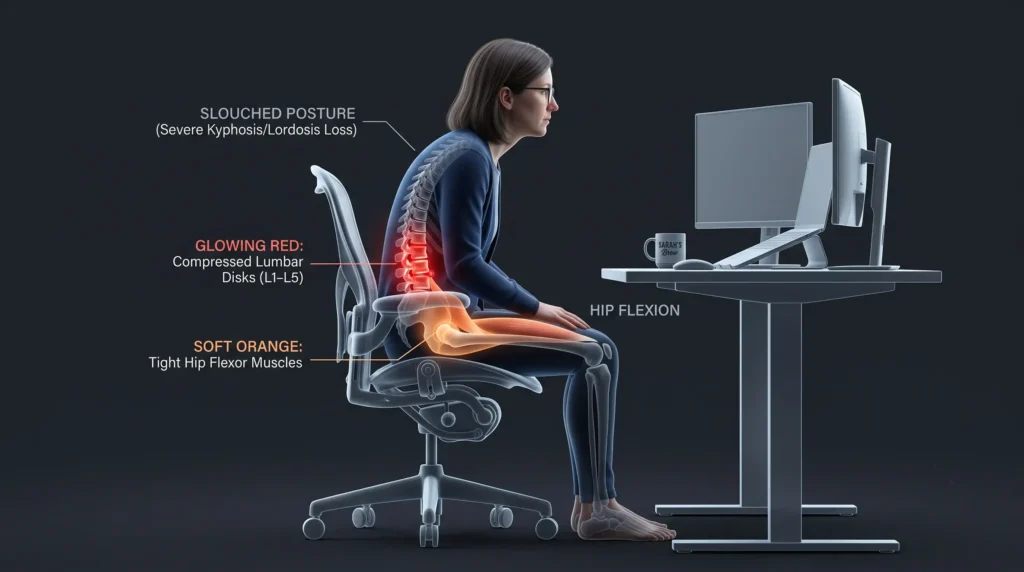
Disc pressure builds up. The discs in your lumbar spine act as cushions between each vertebra. Sitting — especially slouched sitting — increases the load on the front of these discs far more than standing does. Over time, that sustained pressure can aggravate existing issues or simply wear on tissue that was never designed for constant compression.
Your muscles stop doing their job. A chair does a lot of the work your core and back muscles are supposed to be doing. Over months and years, this leads to weaker stabilizing muscles, which means less support for your spine during the rest of the day — lifting groceries, playing with your kids, or just standing up too fast.
Hip flexors tighten, and your lower back pays for it. Sitting shortens the muscles at the front of your hips. Tight hip flexors pull on your pelvis, which changes the angle of your lower spine and can increase strain even when you’re not sitting.
Static posture fatigues specific muscle groups. Unlike walking, where muscles fire and rest in a rhythm, sitting asks certain lower back muscles to hold a fixed contraction for long stretches. That kind of static load fatigues muscle fibers faster than dynamic movement does, which is part of why the ache tends to build gradually across the day rather than hit you all at once.
Add a chair with poor lumbar support, a desk that’s the wrong height, or a habit of leaning toward your screen, and you’ve got a near-perfect setup for chronic discomfort.
➟ Stop Strain Now: 5 Fix Forward Head Posture Exercises That Save Your Neck
Desk Job Lower Back Pain: Spotting the Pattern
Not every backache is caused by your job, so it helps to know the signs that your workstation is actually the culprit:
- The pain builds steadily through the day and eases somewhat once you’re up and moving.
- It’s worse after long meetings, deep-focus work sessions, or days with back-to-back video calls.
- Standing, walking, or lying down brings noticeable relief.
- It tends to ease over the weekend and return by Tuesday or Wednesday.
If that sounds familiar, your setup and your habits — not some deeper issue — are likely the main driver.
Table of Contents
Upper Back Pain From Sitting at a Desk
Lower back pain rarely travels alone. Many desk workers also develop tension between the shoulder blades or across the upper back, and the cause is closely related. Hours of reaching toward a keyboard or leaning into a screen shortens the muscles across your chest while overstretching and weakening the muscles between your shoulder blades. The result is that familiar knot people rub at the end of a long workday.
Simple habits help here: keep your shoulders relaxed rather than hunched toward your ears, bring your screen close enough that you’re not leaning forward to read it, and build in a few shoulder blade squeezes throughout the day to counteract the forward pull.
Neck and Back Pain From Sitting at a Computer
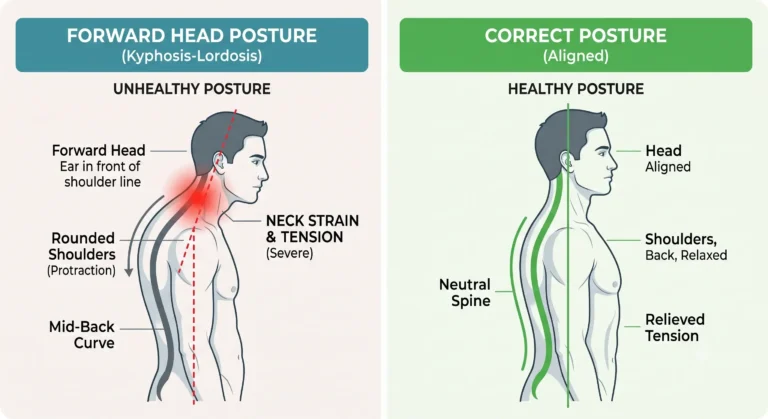
Your neck and your lower back are more connected than most people realize. When your monitor sits too low or too far away, your head drifts forward to compensate — a posture often nicknamed “tech neck.” Every inch your head moves forward multiplies the load your neck muscles have to support, and that strain doesn’t stay isolated. It tends to pull your shoulders and upper spine along with it, which changes how your whole back holds itself up, including your lower spine.
A few adjustments make a real difference:
- Raise your monitor so the top of the screen sits roughly at eye level.
- Keep the screen an arm’s length away rather than leaning in to read it.
- Bring your phone up to eye level instead of tilting your head down to look at it.
- Take a break from screens every 30 to 60 minutes, even if it’s just 60 seconds of looking somewhere else and rolling your shoulders.
A Note on Wrist and Hand Strain
Posture problems aren’t limited to your spine. If you’ve switched to an ergonomic mouse like the MX Master 3 hoping to solve mx master 3 wrist pain, know that mouse shape is only part of the equation. Wrist discomfort with any mouse — ergonomic or not — is often made worse by a desk or armrest height that forces your wrist into an awkward angle, or by gripping the mouse too tightly out of habit. Pairing a better mouse with a properly adjusted desk height and armrests, and taking regular breaks to shake out your hands, tends to produce better results than the mouse alone.
Tailbone Pain From Sitting at a Desk
If your discomfort sits lower and more centered — right at the base of your spine — you may be dealing with tailbone pain, medically known as coccydynia, rather than general lower back pain. Your tailbone is one of the weight-bearing points your body relies on when you sit, alongside your sit bones. Long stretches in a chair, especially a hard or poorly cushioned one, put direct pressure on this small bone and the muscles and ligaments attached to it.
Common relief strategies include:
- A cushion with a cutout or wedge shape to take pressure off the tailbone directly.
- Leaning slightly forward while seated to shift weight away from the area.
- Standing and moving every 20 to 30 minutes rather than staying seated through the whole task.
Tailbone pain that doesn’t improve with these changes, or that comes with fever, numbness, or pain that spreads to your hips, is worth getting checked out rather than managing indefinitely on your own.

How to Prevent Lower Back Pain at a Desk
Prevention comes down to two things working together: how your workstation is set up, and how often you break the pattern of sitting still.
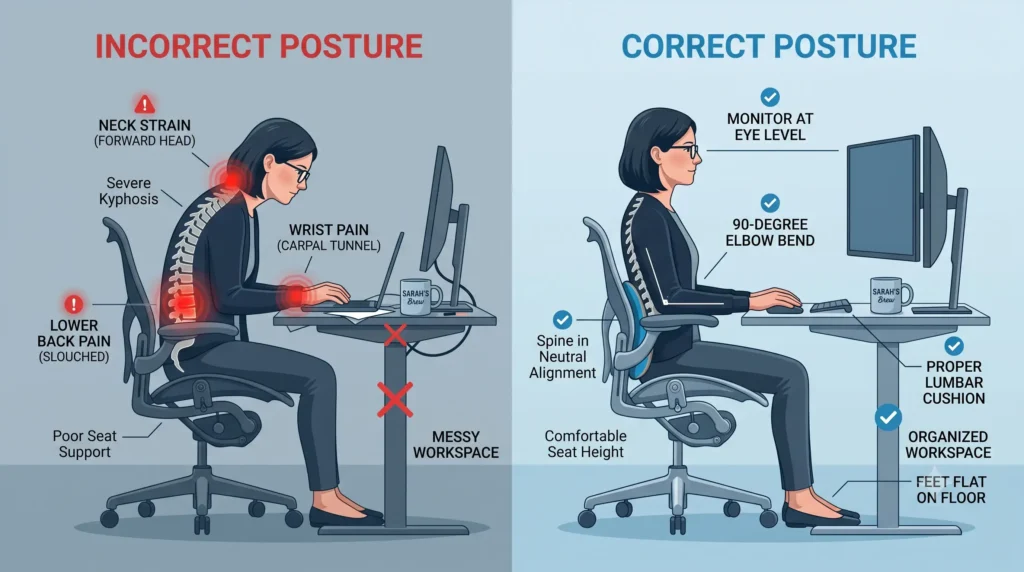
Get your ergonomics right.
- Feet flat on the floor, knees roughly level with or slightly below your hips.
- A chair with real lumbar support, or a rolled towel/lumbar cushion positioned at the curve of your lower back.
- Elbows bent around 90 degrees, with your keyboard and mouse close enough that you’re not reaching.
- Monitor at eye level, about an arm’s length away.
Move on a schedule, not on willpower. Set a recurring alarm every 30 minutes. When it goes off, stand, stretch, refill your water, or just walk to another room. Waiting until you “feel like” moving usually means waiting too long.
Build real movement into your week. Research has linked regular exercise, even just two to three sessions a week, to a meaningfully lower risk of developing lower back pain. This doesn’t need to be intense — walking, swimming, or a simple home routine all count.
Try alternating positions. A sit-stand desk, or even a desktop converter, lets you shift between sitting and standing without changing tasks. Some people also find a stability ball or kneeling chair useful for short stretches, though these shouldn’t fully replace a supportive office chair.

Real Recovery: What Actually Worked for One Desk Worker
Case examples are useful because they show what the day-to-day version of “doing the exercises” actually looks like, rather than just the theory.
Neo had dealt with an on-and-off bad back since his late twenties — the kind that flares for a week, calms down, and then quietly comes back a few months later. Like a lot of people, he assumed it was just something to live with. It wasn’t until years later that he finally saw a physical therapist, and the results surprised him: it only took four total visits, spaced about a month apart, to get his back to a noticeably better place. The real work, by his own account, wasn’t the appointments themselves — it was the roughly 20 minutes a day of prescribed exercises he stuck with between sessions. Since then, his back has stayed in good shape.
His main regret was simply waiting so long to get evaluated in the first place. His take, based on his own experience, is that it’s often worth trying a consistent stretching and strengthening routine first, and if that doesn’t bring meaningful relief, that’s the signal to bring in a doctor or physical therapist rather than continuing to guess at home. That’s a reasonable starting point for many people, though it’s worth saying plainly: if pain is severe, spreading into your legs, or paired with numbness, weakness, or changes in bladder or bowel function, skip the wait-and-see approach and get evaluated right away.
When to See a Doctor
Most lower back pain from sitting at a desk improves with better ergonomics, movement, and time. But certain signs point to something that needs professional attention rather than home remedies:
- Pain that spreads down one or both legs, especially past the knee.
- Numbness, tingling, or weakness in your legs or feet.
- Pain that wakes you up at night or worsens even at rest.
- Any change in bladder or bowel control.
- Pain that hasn’t improved at all after several weeks of consistent effort.
A physical therapist or physician can pinpoint whether the issue is muscular, disc-related, or something else entirely, and build a plan around your specific situation rather than a generic set of desk stretches.
The Bottom Line
Desk-related back pain isn’t a life sentence, and it isn’t something you just have to accept as the cost of an office job. Lower back pain from sitting at a desk almost always responds to a combination of better ergonomics, regular movement throughout the day, and — for a lot of people, like Neo — a short course of targeted exercises from a physical therapist. Start with the basics: fix your workstation setup, get up on a schedule, and build a little consistent movement into your week. If a few weeks of that doesn’t move the needle, that’s your cue to get a professional opinion rather than pushing through it indefinitely.
This article is for informational and educational purposes only and is not a substitute for professional medical advice, diagnosis, or treatment. Always consult your doctor or a qualified health provider before starting any new diet, exercise, or wellness routine.
Frequently Asked Questions (FAQs):
Q1: How to fix lower back pain from desk job?
Fixing desk job lower back pain starts with getting your ergonomics right — feet flat on the floor, a chair with real lumbar support, and your monitor at eye level. Pair this with moving every 30 minutes instead of sitting through the whole task, since static posture is what fatigues your lower back muscles in the first place. If a few weeks of these changes don’t help, a physical therapist can build a targeted exercise plan, the way it worked for Neo in just four visits.
Q2: How to fix lower back pain from sitting down?
Lower back pain from sitting at a desk improves fastest when you break up long sitting stretches with regular movement — standing, walking, or stretching at least every half hour. Combine this with a properly adjusted workstation (lumbar support, correct chair height, monitor at arm’s length) so you’re not reinforcing the slouched posture that builds disc pressure. Consistent daily movement, even light exercise two to three times a week, lowers your risk of the pain returning.
Q3: How to release lower back tension?
Releasing lower back tension comes down to counteracting the static muscle load that builds up from sitting still for long periods. Standing up, walking briefly, or shifting position every 30 minutes gives fatigued muscles a chance to reset instead of holding one contraction all day. Loosening tight hip flexors also helps, since they pull on your pelvis and add strain to your lower back even when you’re not seated.
Q4: How to know if lower back pain is muscular or spinal?
You can spot the pattern of desk job lower back pain by watching how it behaves: it builds steadily through the day, eases when you stand or walk, and often calms down over the weekend — signs pointing to a muscular, posture-related cause. Pain that spreads down your leg, comes with numbness or tingling, or doesn’t ease with movement suggests something more spinal or nerve-related. A physical therapist or physician can pinpoint whether the issue is muscular, disc-related, or something else, rather than relying on guesswork at home.
Q5: What is the fastest way to heal a lower back strain?
The fastest documented path in this guide combines consistent daily exercises with professional guidance — Neo saw real improvement after just four physical therapy visits, spaced a month apart, alongside about 20 minutes of prescribed exercises daily. Pairing that routine with better desk ergonomics and regular movement throughout the day speeds up recovery further. If pain doesn't improve with this approach, or if it spreads into your legs or comes with numbness, seeing a doctor promptly is the recommended next step rather than continuing to wait it out.
Amara
Holistic Wellness & Lifestyle Editor
Amara translates daily wellness science into simple, sustainable, and actionable habits for modern living.
More in Daily Wellness

Don’t Ignore These 9 Warning Early Perimenopause Symptoms in 30s
Struggling with irregular cycles or fatigue? Don't ignore these early perimenopause symptoms…
Stop Strain Now: 5 Fix Forward Head Posture Exercises That Save Your Neck
Suffering from tech neck? Discover 5 targeted fix forward head posture exercises,…
7 Proven Polyvagal Exercises for Nervous System Regulation: End Chronic Panic & Feel Safe
Logic can't talk your body down from panic. Master 7 polyvagal exercises…

Infrared Sauna vs Traditional Sauna: Don’t Waste 1 Minute on the Wrong Choice
Discover Infrared Sauna vs Traditional Sauna for muscle recovery and longevity. Compare…

8 Powerful Ways to Increase REM Sleep (Stop Waking Up Tired)
Sleeping 8 hours but still exhausted? Discover 8 science-backed ways to increase…
How to Fix Sleeping Posture: 4 Proven Ways to Stop Morning Neck Pain
Learn how to fix sleeping posture with 4 research-backed rules. Discover the…
Stop Waking Up Exhausted: 7 Proven Ways to Increase Deep Sleep and REM Sleep Naturally
Sleeping 8 hours but still waking up tired? Discover science-backed habits, foods,…

Stop the Pain: 5 Proven Somatic Tracking for Fibromyalgia Steps
Break the chronic flare-up cycle. Learn how Somatic Tracking for Fibromyalgia calms…